Title: My proposed new system
Post by: TX-Rahman on August 09, 2006, 07:32:15 am
Gentlemen,
Copper mentioned that he was about to build a new system in another topic... I too want to build a new system. This time it won't be as cheap as previous times however. I was going to go with the new Intel Core 2 technology but the prices are just unreasonable. Also, I want to buy a BFG 7950 GX2 1GB video card that costs $609 and will eventually allow me to go Quad SLI. I have figured it will cost around $1500 - $1700 to build the machine I want.
I'll post my wishlist later tonight! I look forward to finding out what you guys may be thinking about building!!
Regards,
TX-Rahman
"BLACK 4"

Copper mentioned that he was about to build a new system in another topic... I too want to build a new system. This time it won't be as cheap as previous times however. I was going to go with the new Intel Core 2 technology but the prices are just unreasonable. Also, I want to buy a BFG 7950 GX2 1GB video card that costs $609 and will eventually allow me to go Quad SLI. I have figured it will cost around $1500 - $1700 to build the machine I want.
I'll post my wishlist later tonight! I look forward to finding out what you guys may be thinking about building!!
Regards,
TX-Rahman
"BLACK 4"
Title: Re: My proposed new system
Post by: TX-Copper on August 09, 2006, 08:56:22 pm
this is what im considering:MSI K9N SLI platnium mb with Athlon 64 5000+ X2 AM2 socket duel core 2x MSI 7900GT 256 meg PCI-X NVIDIA video cards (thats 2 baby) 4gig PC 533 DDR2 ram WD 320 GIG SAT A2 7200, 16 meg HD LG 16x DVD-R/RW duel mb will have all the bells and whistles...with 10 usb, 7.1 surround, raid, firewire etc. might up the ram to something faster, and a 1 gig video card here is running about a grand, so no go for me.I too look forward to feedback and suggestions.
Title: Re: My proposed new system
Post by: TX-EcoDragon on August 11, 2006, 06:33:49 am
When you guys are done can I come over and play??S!TX-EcoDragonBlack 1TX-Squadron XO
Title: Re: My proposed new system
Post by: TX-EcoDragon on November 19, 2006, 08:30:37 pm
It seems like the E6300 and E6600 are the deal of the new stuff now. . . it overclocks well, generally 400x9 and 3.6 GHz is reported to be doable as a stable 24/7 setup even for some on good air coolers, and ends up many times faster than anything AMD has, and much faster than the stock X6800 Extreme ($1,000 cpu!) Sadly stuff like FSX that REALLY taxes the hardware doesn't really use the multi cores. . .at least for now.Here half of the GeForce 7900GTX-Quad Video Card stack for 420.00Amazing to think I once paid that much for a Gainward GF4 Ti4600http://cgi.ebay.com/1024MB-1GB-GeForce-7900GTX-Quad-Video-Card_W0QQitemZ190044525037QQihZ009QQcategoryZ40161QQrdZ1QQcmdZViewItemThat said, the nVidia 8800's are out. . .DX10 will be nice for FSX.S!TX-EcoDragonBlack 1TX-Squadron XO
Title: Re: My proposed new system
Post by: TX-EcoDragon on January 27, 2007, 05:11:05 pm
Being unable to use my computer for anything but internet has given me some time to research this last month. . . My dream cart:CPU: Core 2 Duo E6600 Motherboard: Asus P5B Deluxe or Abit AB9 QuadGT Memory: 2GB Ballistix DDR2 -1000Graphics Card: 8800GTX maybe 7900GS for a few months till price dropsHard Drives: 2x 320 gig Barracuda 7200.10 in RAID 0 Sound Card: X-Fi Platinum Power Supply: PC P&C Silencer 750 or OCZ GameXStream 850 CaseCase: Coolermaster Stacker STC-T01CPU cooling: TuniqTower 120 then Swiftech H20-220 Ultra or DangerDen 2x120 radiator water cooling on CPU and GPU.The recently released C2D E4400 and the older E6300 overclock very well, and exceed the stock performance of the top end Core 2 Duo X6800 Extreme, all at a cost as low as 149.99 (frys, with a very low end mobo thrown in-ebay that). Nice bang for the buck there, that and a 7900GS might actually let me get back up and running and still let me upgrade in 5 months or so when prices have dropped some.S!TX-EcoDragonBlack 1TX-Squadron XO
Title: Re: My proposed new system
Post by: TX-EcoDragon on February 12, 2007, 09:32:36 am
OK, it's all purchased!The following lists all items, and final prices after tax, shipping, and any rebates or credits. CPU: Core 2 Duo E6600 (purchased-frys.com) $318.53Memory: 2GB Ballistix Tracer DDR2 -1000 (purchased-NewEgg.com) $290.26Hard Drives:320 gig Barracuda 7200.10 (newegg) 96.51-15= $81.51Sound Card: X-Fi Platinum (purchased-Amazon.com) $72.99Power Supply: PC P&C Silencer 750 ( purchased-frozencpu.com) $215.29Case: Coolermaster Stacker STC-T01 $151CPU cooling: TuniqTower 120 (Purchased-svc.com) $56.26Mobo: AB9 QuadGT (w/wifi card) $223.03 -15 paypal rebate -25 credit (newegg) $183.03Video Card: eVGA 8800GTS 640meg (newegg) $394.39 ----------------------------------------------------------------------------------------------------------Total: $1762.40The only other things I may add are a 44 dollar SATA DVD RW drive, and five 120mm fans for 21 bucks.Needless to say it's gonna be living on the cheap for a while, though I also feel that I selected top quality parts (vid card as exception) and bought piece by piece when I got deals. . .I'm just gonna keep telling myself I got deals. . .must. . .try. . .to. . justify. . . Now I just gotta await delivery of the hard drive, vid card, PSU, and mobo and then build the thing. . .and then OC it. . .I hope she comes to life!S!TX-EcoDragonBlack 1TX-Squadron XO
Title: Re: My proposed new system
Post by: TX-EcoDragon on February 24, 2007, 04:23:58 pm
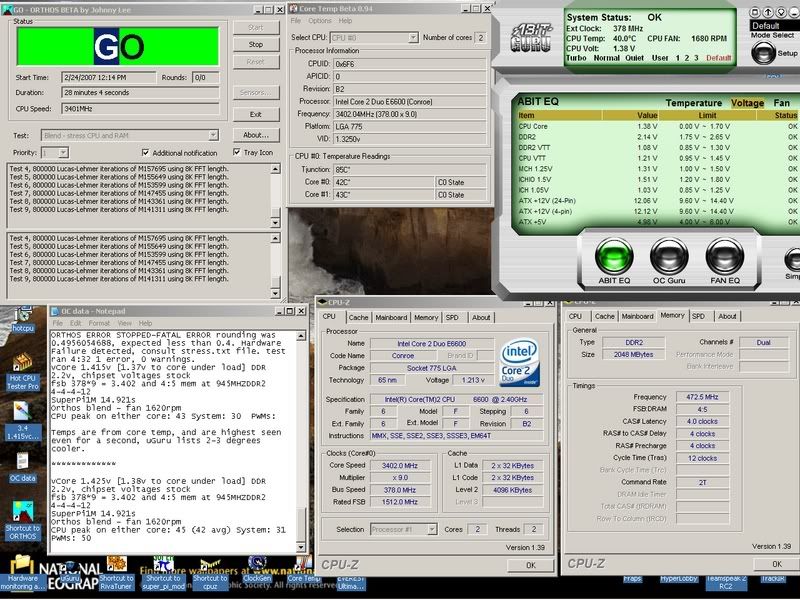 vCore 1.425v (1.38v to core under load). All other voltages are stock defaults. I didn't need the bumps to the NB,SB, fsb etc.FSB: 378*9 = 3.402GHz E6600 and 4:5 mem at 945MHZ DDR2 4-4-4-12SuperPi1M: 14.921sOrthos blend - Tuniq fan 1620-1680rpmCPU peak on either core: 45C (42-43 avg) System: 33C PWMs: 49CTemps from core temp, and are highest seen even for a second, uGuru lists 2-3 degrees cooler.This cpu seems good to go the distance, though don't plan on moving higher than 3.6 GHz once the system is "burned in" a little bit. Even at stock E6600 clocks all programs I own except FSX run 100% maxxed out and at very high fps. For Example, after forcing High Quality Textures, 16x AA, 16X AF, Supersampling, etc, in BF2 SF at 1600x1200 with max audio and video quality I average around 120 fps. FS2004 looks great with everything tweaked, FSX does too, but of course this program will bring my machine to 14-20 fps if you max out everything plus AI traffic, water, and then fly around KJFK with snow falling. . .hence the resire to get overclocking capability.S!TX-EcoDragonBlack 1TX-Squadron XO
Title: Re: My proposed new system
Post by: TX-Rahman on March 10, 2007, 04:33:49 pm
Ok...finally months after posting the original message... I just got back from Fry's...here's what I bought.Mobo: eVGA nforce 680i 235.27 + $50 mail in rebateProc: Intel E6600 283.73Mem: OCZ DDR2 2gb 6400 249.00 + $30 mail in rebatecooler: Zalman CNPS9700 69.99PSU: Thermaltake TP750 139.00Videocard: None yetCase: none yetHD: None yetDVDRW: Existing Memorex----------------------------------------------------------------------SPENT SO FAR $986.99Rebates: - 80.00-----------------------------------------------Total $906.99I kinda cheaped out on the ram and may take it back. I bought 6400 high end ram vs. the 8000 higher CAS ram at nearly the same price. This OCZ ram is the new dual cool ram, has water cooling spigets plus huge fins so you can cool either way. The guy there told me I can still OC if I want to because it's higher end, lower CAS ram. I'm not sure. I may take it back and get SLi certified 8000 ram. Any ideas? Was this a bad choice? Eco?Now I just need, case, videocards, hard drives, soundcard and I should be rockin. Not sure on the case...still looking there. Hard drives: I want Raptors or RaptorX 150GB 10,000 drives...probably 2 in a raid. (Stripe)VideoCards: Either eVGA or BFG 8800GTX. 1 for now, add one later. I didn't buy today because I can save $100 by buying online.Soundcard: Mobo has built in but I will probably get the XFi card also...Tell me what you think! I wish I had it all...dying to put it together today!Regards,TX-Rahman"BLACK 4"
Title: Re: My proposed new system
Post by: TX-EcoDragon on March 10, 2007, 09:36:43 pm
I posted this over on the HISTORIA forums, and thought I'd duplicate it here as it lists the reasoning behind my purchase choices listed previously:"Well, I spent the last three months reading the top forums I know of and watching every topic related to each of these components, and in the case department I went with the hands on approach since I'm apparently more finicky than most people on the forums. I'll list what I bought, and then why. CPU: Core 2 Duo E6600 (frys.com) Motherboard: Abit AB9 QuadGT (was also looking at Intel 975XBX2, and Asus P5B Deluxe in that order) (newegg) Memory: 2GB Ballistix Tracer DDR2 -1000 (NewEgg.com) Hard Drives: 320 gig Barracuda 7200.10 (newegg) Sound Card: X-Fi Platinum (Amazon.com) Power Supply: PC P&C Silencer 750 (frozencpu.com) Case: Coolermaster Stacker STC-T01 (CompUSA) CPU cooling: TuniqTower 120 (svc.com) Video Card: eVGA 8800GTS 640meg (newegg) My total cost came to right around 1700.00 after rebates, tax and shipping, the only things I didn't buy to complete the machine are the two DVD drives. I was at first looking at the eVGA 680i as it seemed the clear choice before I dug into the issue further. After having done that though I realized that it would be worth it to me only if I went SLI, which I concluded wasn't a wise financial choice for me as I wasn't going to buy two vid card right away if I did it at all, and that the main advantage comes at resolutions higher than the 1600x1200 I run, and that by the time I was ready to buy a second video card a newer single card solution would be higher performance anyway. With SLI ruled out the choices became 965/975 as they have somewhat better overclock potential and performance, and a little better stability and maturity as well.I wanted something that will give good Quadcore support, good overclocking performance (not simply high FSB which some boards get by very lax system latencies), have all the features I need for my main machine like firewire, stability, cool temps (and as such not too much noise from cooling), lots of USB 2.0 ports, and be solid and stable with respect to voltages and OCing. I soon learned that the top overclockers in the 965 chipset series where earning this title by lax system latencies and that their performance wasn't as good as boards at lower FSBs and tighter latencies. The main advantages of the 975 (intel975XBX2 or ASUS P5WDH) are a mature BIOS, good voltage regulation and stability, manual strap control, native IDE support so no need for the annoying JMicron controller, and that clock for the clock the 975 chipset performance was better than the 965 chipsets (with one exception), particularly in graphics applications and games, but that the max clocks were lower on the 975s, so if you only wanted an OC no greater than 430ish FSB the 975 was best, but for FSBs over 460mhz the 965 was better. I settled on the P5B Deluxe before learning that it was one of those that ran lax latencies to get it's great clocks, it also had the usual host of little issues, I moved on thinking I'd just get the Intel975XBX2 which was a re-release of Intel's top 975 board that included QuadCore support, and better performance in general. Then came the board I wished there was. . .almost. . . The Abit AB9 QuadGT. It is a P965 that had the tighter system and memory sub timings, good voltage regulation, manual strap control to reward those with premium hardware (like the 975XBX2), and overall the best performance yet. It still clocks over 500 FSB but can do it on the 1066 strap if your memory is up to it, so there isn't a big hit to your performance moving above 400 FSB like other 965 boards (that's why to get better performance than 400 FSB most people have to go to 460+ FSB!!), and it had all the features I wanted. . .only trouble was that the BIOS had some issues with RAID and IDE drives due to the JMicron controller and the board was clearly released too soon. The overall quality of the board, it's features, and performance places it above all other 965 boards in my appraisal and the performance and stability advantage that the 975s have in the 400-430 FSB range this board has as well, but takes it all the way to over 520 FSB like a 965 chipset. The BIOS has many OC oriented features, including 6 different profiles that you can save and load at boot, so I can select whatever global BIOS settings I want with a single selection, it's got a CMOS clear on the back of the IO panel so no need to go after the jumper, digital PWMs that are supposed to be the bees knees, one of the "best software based OC utilities" in the uGuru software. . . etc. So I waited and watched for the next beta BIOS, it came, and solved those troubles, so I went for it. I'm not sure I'd recomend it to somebody that didn't want to read how to best set it up or who is afraid of BIOS flashes though, as it's still pretty new. Most of the 965 boards went through this with the JMicron controller, they are just older and more mature at this point. It's also probably that the next board releases from the other big names will follow suit and release boards with similar controls and OC oriented BIOS, since "enthusiasts" are on to the tricks that were being used for the major OCs, and are ebaying their older 965s and going with the 975XBX2 or the QuadGT. How much difference this performance boost is worth is up to you. . . if you don't OC, don't even bother thinking about any of this, just get a stable board and BIOS with the features you want at the best price. I don't care that I get 14 more fps in BF2 than a P5B deluxe or DS3 while at a 70mhz clock disadvantage, since those boards are getting around 140 anyway! I was worried about FSX. . .I wanted all I could get since I knew FSX would eat my machine, and any machine, for lunch if you max everything out, and I like the idea of needing to pump lower voltage through my board, memory, and CPU, and run lower clocks for the same performance. Also, my QuadGT wasn’t much more than the older 965 boards, and is cheaper than the supposed top end 965 boards like the Commando. Almost all E6600 owners were seeing 3.6 GHz on good air cooling (early cpus needed to be "good weeks" to not need high vCore or to get to even 3.4), and that's around what I wanted to reach at a minimum. E6700s and 6800s wheren't getting any higher, but the multipliers they have could offer the advantage of lower FSBs with higher multis, but with my hardware selection that wouldn't really be of interest to me anyway. After looking at the practical side of what people were actually getting, the E4300 also started looking like a great cost saving option since I could get it for 139.99 at Frys, and it would hit 3.4Gz typically, it's main drawback was that it had only 2mb of cache vs the 6600 and higher which have 4MB, but at that price it's worth a real look. I got a E6600 for 297 so I went for it, knowing that it's expected to be 218 around April 22nd. Life's too short to wait for 79 bucks. Mine is a week 36A which wasn't a good sign, but the later weeks like mine appear to OC just fine at core voltages similar to the earlier "B" steppings so I've got no complaints there. I posted another thread here talking about the difference between the 8800GTS and the GTX in FSX, which is my performance benchmark since most all else is easy triple digit fps for either card on a core 2 duo. The GTX would get me twice the AA at otherwise identical settings, and since I don't like the look of more than 2-4x in sims anyway, I decided it wasn't money I needed to spend, the only other program that might matter now is Oblivion, and I don't care one bit about it, but there was a similar experience there. . .also as is often the case, the overclocking potential of the GTS is often as high as the GTX. GTS it is for me, and my 90 day step up from eVGA should get me the option to upgrade to an 8900GTX if I happen to want to go that route. The main thing with the memory is to get the Micron D9GMH or the Micron D9GKX chips on the sticks if you are going to OC. If not, it's not much of a big deal. Some memory makers flip flop between the chips, so the great deal that is Buffalo Firestix is sometimes not as great when you find promos under the heatspreaders, though apparently the Firestix are once again D9GMH after word went out that they had D9s and some reviewers found promos. The D9GKX are the top of the top, but come at a price premium, the D9GMH can be found in some 2GB sets for under 300.00 (not that that’s cheap). Mine are D9GMH since the difference isn't much, and I didn't expect to be going to such high OCs that I'd even tax what I got. Of what you listed the Dominators have been hit and miss, and I would vote Crucial. The DDR2 800 are often the same exact sticks as the 1000, but the 1000 is still a higher bin so they are a sure thing, and carry the D9GMH chips for sure, and many people find they can run 3-3-3-9 or 3-3-3-7 timings or manage over 1100 mhz on the clocks at looser timings. Great deals can be found on the Firestix (last I saw was 169.99 for 2GB DDR2 800), and you can get 4 gigs for a little more than two gigs of crucial but there is still a chance you'll get promo chips. I got VERY close to buying a 150 gig Raptor X for 169.99 before a 12% off coupon, but taking everthing into consideration the Seagate 7200.10 drives just made better sense. You could get 640 gigs of RAID 0 for the same price as my above listed "great deal" on the 150 gig raptor. While the Raptor does offer a performance boost even over the 7200.10 in RAID 0 it's simply not enough to justify it to me, plus I'd still need to buy the 320 for some storage anyway, so it was a safe buy. All the deals that there have been on Raptors suggest that prices are falling on them, and probably will keep dropping pretty quick as the market gets used to high performance, fairly quiet, low cost, and massive drives like the 7200.10s. The Sony optical drives are always different as they are just rebrands of other names. I used the DRU820A as it's based on the BenQ 1670 which is a top rated drive for read and write quality, noise, speed, and compatibility. The DRU830A is actually more money and is a rebadged Samsung SH-S182D which is a lower end drive than the 820A, though fine for most. The funny way people are though suggests you can save money on the older model and get a better drive at the same time. The sound card was either the Bluegears B-Inspirer or the ubiquitous X-fi. I got 100.00 off the X-Fi Platinum so I went for it. There are some issues if you want digital output, but otherwise it’s been impressive to me. The Bluegears model is apparently very highly regarded amongst the audiophiles, but for a gaming machine the X-Fi is probably just fine, and will support EAX and such which most games support. The Powersupply was another big research endeavor. I didn’t wanna fork over tons of cash for what is an otherwise unglamorous part of a build, and I knew from previous dealings with PC Power and cooling that while they made great products, and were very customer satisfaction driven, they were pricey. The OCZ GameXstream 600,700, and 850 were all around for much less money, and many people use them, they appear to have pretty good efficiency, but the 600 and 700 watt units have pretty serious voltage ripple issues when at higher outputs, and I didn’t like the potential ramifications that had for sending my components to an early grave, and causing instability when overclocking, so I moved on. The 700, if powering a system that isn’t taxing it much is probably a fine choice for under 100.00, but I wouldn’t go that route if you want to push it to the higher end of it’s output range (might not be that easy really). The 850 looks good, is pretty efficient, and has lots of power, but has similar architecture to the lower watt variants and while the serious PSU testers haven’t had the ripple issue with it, I still had some doubts. The OCZ units are actually made by Fortron, and that is usually a brand thought to be synonymous high quality, but again, this particular design has the ripple issue to contend with, and they are dealing with it for their next models, but for now, I’d steer clear of these too unless they’ve ben stressed to their rated ouputs without the ripple issues popping up, though I didn’t research these directly, the 700 watt unit is apparently internally the same as the OCZ. Teh Thermaltake units have a very checkered past it seems, and aren't recomended in general, so scratch those too.The Silverstone Zeus line was highly recommended and could still be found a little cheaper than the PCP&C Silencer 750, but I found out that these units have cheap brittle connectors that are prone to failure, and in some cases have actually melted into video cards, that they produce loads of RF interference, and that in a few reviews they give off acrid odors. . .no thanks. . . for another 20 bucks I’ll just get the Silencer 750 and know it will treat me right, will give me a single rail with 60 amps on it and up to 850 watts of power, so no problems with 18A rails of multi rail PSUs failing to feed monster video cards (liketh R600 is reported to be), no need to do any load balancing like you do with multi rail PSUs, and no fear that I’ll need more power even if I go SLI with two 8900GTXs. Worth a look is the Seasonic S12 700 which while it’s listed as a 4 rail PSU with 18A per rail, it actually is a two rail with 36amps per rail, so this is probably a good middle ground, the only trouble is that these are still kinda pricey, and the highest you’ll get is 700 watts. So again it’s hard not to look at the Silencer 750. If you wanted a modular PSU Seasonic make a M12 700 that is modular, and PC Power & Cooling wont do Modular as they think the added resistance isn’t worth it, being the way that I am about efficiency, I opted out of modular as well, and in my Coolermaster Stacker cable management is cake with many places to hide loads of cables. I just noticed that you mentioned this unit in your post, so I guess you’ve already figured this out. The case was the next thing I spent the most time on. . .ironically. I wanted the perfect case, and to me, it’s the Silverstone TJ-09, or the LianLi PCV1200 or greater. I looked at the TJ-07, and the TJ-09 in person, and they are all gorgeous cases that have the look and feel of something built by true craftsman, and designed by engineers that didn’t fail their thermodynamics courses. Only trouble is the price of the 07 and 09. The 06 is interesting, but the hard drive positioning didn’t pass the thermodynamics part of the equation. The PCV1200 was very close to my next case, as were the larger PCV-2000s but the 1200 didn’t have much room inside for watercooling gear was a little loud for only two fans, and was still pricey, and didn’t offer much modding capacity if the watercooling demanded it, the larger 2000 was huge, needs cable extensions on everything, would require more fans and modding to make them fit, and even it required the power supply to stick out the back on larger PSUs or removal of the lower drive bays, and even though I really like the thermodynamic aspects of the inverted motherboard I didn’t go this route. I looked at the Thermaltake Armor (with 25cm sidefan) and it was cheap feeling and looking, had weird mounting for the USB and Firewire, less room for my planned water cooling setup, and wasn’t cheap to make up for it’s shortcomings. The most impressive cases I saw that were actually affordable were from coolermaster. Their Centurion Five actually had a fair amount of room, was well built, had good cooling, and could be found for less than 30.00 at some places after rebate. The Stacker 830 was nice, but not all that big inside, and kinda plastic feeling for it’s very high price (dude if you are at this price bracket just get the TJ-09!!), and when the watercooling time came I’d again be limited by it’s internal dimensions. When I saw the Coolermaster Stacker STC-T01 in person I was impressed. Exceptionally solid, well built, spacious, logical, flexible design that could be a great air cooling case or a great water cooling case, it didn’t look like a horny disco alien, dying dragon or plasmodial slime mold that I’d be ashamed of when adults came over. . . and I could get it for the same price as the Armor. In photos it didn’t grab me at first, but once I saw and fiddled with these cases this one stood out in it’s price range, and while it’s no TJ-09, for me it’s the next best, and even though I planned on adding a couple extra fans in the many places that I can in this case, the cooling is quite nice as is, and keeps my system cool enough that I don’t need to change a thing. Whew. . . that's like 5 pages in Word. . .I guess I must feel like if I put all this on paper the fact that I spent far too long reading about this crap is a little more worth it. . .but that’s my .02 x 100 (hey, that’ll buy a soda!)S!TX-EcoDragonBlack 1TX-Squadron XO
Title: Re: My proposed new system
Post by: TX-Rahman on March 10, 2007, 11:16:01 pm
Wow ok. I feel like I made a bunch of bad choices now. lolAfter reading more about my ram online in reviews, I feel better. I can always dump it and buy something better if I have any problems I guess.I want SLi so the eVGA 608i mobo was a no brainer for me.I need to look at the date stamp on my proc. Can you tell me which weeks were good and where to find the code? (A bit lazy here...lol)HD's I guess I'm still not sure about those. Where did you find $169 150GB RaptorX drives? The cheapest I see them is over $200.You're also making me wonder if I should just go with 8800GTS cards...2 instead of one.... 2 of those won't be much more than one GTX.Cases I just don't know. I looked at the case you have today and didn't like the 10,000 fan mounts. I'm at a loss. I thought I wanted the Armor case. Not sure about that now either...hahaWill have to see how it runs once I put it together. I'm sure I won't be able to clock it like you did due to memory or something... I guess I didn't do my homework after all...damn.  Regards,TX-Rahman"BLACK 4"
Regards,TX-Rahman"BLACK 4"Title: Re: My proposed new system
Post by: TX-EcoDragon on March 11, 2007, 12:13:01 am
As far as the RAM, I'm not sure what particular sticks you got so I can't comment there. The coveted Micron D9s are things you sort of have to look for, and in some cases a particular part number from some companies will have the D9s, then it won't. . .I went with a sure thing. The D9s will overclock to 1100-1200 MHz, and do it down at 4-4-4- timings in many cases. The nice thing about finding D9s in some PC6400 is that it will almost certainly hit the 1000 MHz mark anyway. If you have a part number on yours I can search to see what chips they are using. The CPU codes are the batch numbers written on the UPC sticker, they are also on the heat spreader of the CPU, and will be something like L632A***In that example it's a week 32 A. The B steppings are the ones that are generally thought to be the best. . .of course Frys sent me an A. That said, the more recent chips are not as dependant on the A or B code. . .as they tend to clock better for a given vCore. Mine is a 36 A and while it's not as good as I was hoping, it can do 3.5 at least, and I haven't tried any higher as I don't want to have to dump any more voltage into the core, and it seems that once I went to 3.4 it took a lot more voltage. That's the perk of the B steppings is that they run by default at lower voltages, and need lower voltaes clock for clock. Mine is quite happy at 3.3 with very low vCore, so I thought it was gonna stay that way all the way up to 3.6 but it suddenly started needing bigger voltage bumps as I went past 3.3. Keep in mind I'm using Orthos Blend tests to test for stability, and this will place a full load on pretty much the entire system, including both cores of the CPU. In any of our sims this is easilly twice the load the CPU will see. So technically I can probably run over 3.6GHz on this chip. the truth is, the only thing I run that needs any OC at all is FSX. Everything else runs very well at stock speeds maxxed out at high res.My plan with the video card is to wait for my eVGA step up period to reach it's term and then I may get the 8900GTX if it's out, and if it actually offers any performance boost. I decided against the 8800GTX based on the rather useful review at[H]ardOCP that gave me a pretty clear picture of what the extra money was buying, and it didn't seem worth the cash to me. I posted a summary in this thread: http://www.txsquadron.com/topic.asp?ARCHIVE=&TOPIC_ID=2490S!TX-EcoDragonBlack 1TX-Squadron XO
Title: Re: My proposed new system
Post by: TX-Rahman on March 11, 2007, 12:43:17 am
I have a L39F chip. I searched on google and some of the folks were saying that L41F sucked and they got an L39F and were able to safely clock to 3.5 or 3.6. I guess I'll have to be happy if I can reach that also. I could also just bring it back to Fry's and ask if the guy in the cage can find me a B chip....Regards,TX-Rahman"BLACK 4"
Title: Re: My proposed new system
Post by: TX-EcoDragon on March 12, 2007, 10:36:26 pm
I wouldn't stress too much about it, as it seems the later "weeks" are sort of unknowns anyway since most of the people I see posting on the forums already have their older chips. That's how it was with mine. . . I just decided to see how it did. Recognize that there are no sure things, and that even if it only hits 3.0 GHz it's still gonna be a rocket cpu in most any application. I've heard of one other person with an "F" chip, but I don't recal how it did for them. If you find yours needs too much vCore I guess there is always ebay if you are really after a super clocker chip and you wanna try another one.S!TX-EcoDragonBlack 1TX-Squadron XO
Title: Re: My proposed new system
Post by: TX-Rahman on March 12, 2007, 11:06:37 pm
I'd probably be happy just to get to 3ghz like you said. If I get jmore like the other guys with the same week and batch chip..even better :)I started assembling it tonight. I bought the eVGA 8800GTX today at lunch. I've never in my life paid this much for a video card. I hope it screams FPS!I may also just go with 2 SATA drives instead of one Raptor. I already have 2 7200 RPM SATA drives that are brand new...Regards,TX-Rahman"BLACK 4"
Title: Re: My proposed new system
Post by: TX-ScubaSteve on March 13, 2007, 12:01:39 am
I've never quite understood the different brands offering Nvidia chipsets... I'm assuming eVGA is a good brand? How does it compare to the others like BFG, Foxconn, XFX? At least with ATI... is all seems like the brand and chipset are one in the same... so, as a long time ATI user, I'm a little confused...TX-ScubaSteveWhite 4
Title: Re: My proposed new system
Post by: TX-EcoDragon on March 13, 2007, 12:50:08 am
Yeah, I passed on the Raptor, these Seagate 7200.10 drives seem like an awesome drive. For the same money as that BestBuy deal on the 150 gig Raptor X I could have had two 320 gig 7200.10 drives in RAID0. 640 gigs or 150. . .seems like a pretty easy choice for me given how these 7200.10 series drives are pretty fast as it is.Oh and Steve, I think that the eVGA, XTX, and BFG are pretty much at the top, mostly due to warranty and similar service related stuff. The one thing tha makes eVGA my brand of choice is that they don't try to drop warranty/RMA stuff based on the user having overclocked or modified/removed/replaced the stock heatsink like XFX and BFG will. I also generally see the eVGA stuff running near or at the top in performance, there is a lifetime warranty (though XFX offers a double lifetime warranty which is nice when you want to sell it), and they have a step up program where they will give you an upgraded card minues the cost you paid for your older card, though this only lasts for 90 days, I thought it would give me the chance to get the 8900GTX if I happen to decide it's worth it.S!TX-EcoDragonBlack 1TX-Squadron XO
Title: Re: My proposed new system
Post by: TX-Rahman on March 13, 2007, 08:49:15 am
I'll have to look into those drives Eco.  I haven't hooked up the ones I have yet... I'll probably start working on getting the system powered up for the first time tonight!Welcome back Steve
  Regards,TX-Rahman"BLACK 4"
I haven't hooked up the ones I have yet... I'll probably start working on getting the system powered up for the first time tonight!Welcome back Steve Regards,TX-Rahman"BLACK 4"Title: Re: My proposed new system
Post by: TX-EcoDragon on March 13, 2007, 01:51:45 pm
The 7200.10 is a 7,200 RPM drive of course, so it does lose out here and there, but the difference is in miliseconds most of the time. . .as it is I'm almost always the first person on a map in BF2 or LockOn, and most servers have a timer that helps to get everyone in at the same time so it's really singleplayer that the boost is seen. For other tasks like graphics work etc the 16mb cache on the 7200.10 gives better burst than the Raptor. Though it's seek times are a little lower. The Raptor is also a lot noisier and runs hot, which demands a good case to damp both noise and temperatures.I REALLY wanted to get that Raptor, but I'm glad I didn't at this point, as my drive seems to be faster than it needs to be in everything I do. Sure Benchmarks might go to the Raptors on some things, but I've been around long enough to get too hot and bothered by synthetic benchmarks.http://www.anandtech.com/storage/showdoc.aspx?i=2760&p=8here's the drive at NewEgg: http://www.newegg.com/Product/Product.asp?Item=N82E16822148140 S!TX-EcoDragonBlack 1TX-Squadron XO
Title: Re: My proposed new system
Post by: TX-Rahman on March 15, 2007, 09:01:25 pm
UPDATE:Last night I created the RAID0 (Stripe) with the two 200GB SATAII 300 drives, formatted them and loaded WindowsXP. (I'm glad I was able to find my last XP License and sticker!!) The slower ram was bothering me. Not the perfomance, just cheaping out and going with slower ram. SO... Ivan has a friend who owns a computer store and he has a special right now on DDR2 1066MHZ PC8500 OCZ SLi certified ram at less than I paid for the PC6400. I ordered 2GB. I also ordered a Soundblaster XFi card from him. They should both arrive tomorrow. I'll be taking the slower ram back for a return Link to the ram at his store: https://magnum-pc.com/Products/index.co?id=M003719516More updates to come as they happen! Getting close now!Regards,TX-Rahman"BLACK 4"
Title: Re: My proposed new system
Post by: TX-EcoDragon on March 15, 2007, 09:19:38 pm
Sweeeeet!!!S!TX-EcoDragonBlack 1TX-Squadron XO
Title: Re: My proposed new system
Post by: TX-Rahman on March 19, 2007, 11:22:47 am
Eco, Question... I haven't benchmarked my system as of yet. I spent hours totally rewiring my room yesterday. I may be able to test a little tonight then I will be in Dallas at "The Planet" the rest of the week working on my company's BCP disaster recovery site. Have you ran 3Dmark on your system yet? If so, what was your score? Also, was it over clocked for the test or not. Just curious as to what I might expect with the components I have.Thanks,RAHRegards,TX-Rahman"BLACK 4"
Title: Re: My proposed new system
Post by: TX-EcoDragon on March 19, 2007, 08:35:32 pm
I actually haven't, the only benchmarking I've done has been SuperPi, or running tracks in IL-2 etc. When I was first setting up I had a serious issue that appears to have been caused by the OpenAL driver in 3DMark06 that prevented my machine from even booting and required a reformat and re-install of everything, after that I decided I wouldn't be running 3DMark06 even though the issue probably was a fluke. I suppose I could download and run 3d mark 05 though.S!TX-EcoDragonBlack 1TX-Squadron XO
Title: Re: My proposed new system
Post by: TX-EcoDragon on March 19, 2007, 09:01:47 pm
OK, I've got 3DMark05, I'll add more numbers as I get them.At stock settings 2403 Mhz on on the E6600, stock clocks on 8800GTS and default 3dmark profile for quality (8x AF and 4X AA I think), 801MHz and 4-4-4-12 on the ram, 3DMark settings left alone and list 1024x768 res no AA, filtering: optimal, 3_0, 3_0, OffScore: 13,737 [1:1 mem divider @ 534 MHz gives 13,618]S!TX-EcoDragonBlack 1TX-Squadron XO
Title: Re: My proposed new system
Post by: TX-Rahman on March 19, 2007, 09:52:29 pm
So that was with 3dmark05 or 06? I never can understand what all these numbers mean.Regards,TX-Rahman"BLACK 4"
Title: Re: My proposed new system
Post by: TX-EcoDragon on March 19, 2007, 10:30:49 pm
Yes, 3DMark05.Now the same test as above but with my machine running 3402 MHz (1GHZ overclock on E6600), and 4:5 mem divider for 945MHz@ 4-4-4-12, and stock clocks on the 8800GTS: 15,606Same as above but with 8800GTS clocked at 540 Core 837 mem (1674 effective): 16230Same as above but 8800 clocked 550 Core and 850 mem: 16362Running 3DMark06 at 1280x1024, with my CPU OCed to 3.502GHz, and my 8800GTS clocked at 550 core and 850 mem: 10043 Same as above, but with 8800GTS clocked at 648 core and 972 (1944mhz) mem I get 10572 points in 3DMark 06Compare to my system here:http://service.futuremark.com/compare?3dm05=2817073S!TX-EcoDragonBlack 1TX-Squadron XO
Title: Re: My proposed new system
Post by: TX-Rahman on March 19, 2007, 11:07:04 pm
Well...hmm. My 3DMark05 Score: 13531? Your memory timings appear to be better than mine. I have 1066mhz ram but my timings are 5 5 5 15. I guess that would be it? Who knows. lolRegards,TX-Rahman"BLACK 4"
Title: Re: My proposed new system
Post by: TX-EcoDragon on March 19, 2007, 11:16:22 pm
I've edited the above post with more data from the benchmarks at a few different clocks.As far as what might account for the score differences. . .Well, there are a few things that come to mind in addition to the mem timings that could be different, first of all verify what FSB you are running with CPU-Z, mine might be a little different. Also, my motherboard has generally better performance than anything other than 975X chipsets when below 400FSB, and better than anything when above 400FSB due to tighter system sub timings and generally lower latencies, so clock for clock, it generally beats other boards, even at an FSB deficit. . .that's why I got it! Of course I also rebooted before those runs so that could easily make up a few hundred points.S!TX-EcoDragonBlack 1TX-Squadron XO
Title: Re: My proposed new system
Post by: TX-Rahman on March 23, 2007, 09:59:21 am
I think I need to unbind the CPU/Mem clocks so the memory can run at the speed it was designed for. It's running in the 800-900Mhz range when it's 1066 Mhz memory. I ran it completely stock....I didn't modify anything. I was out of town Tuesday-Thursday this week so...I should be able to do some tuning this weekend. I have started copying my CH/Nostromo, etc, etc setting and configurations from my old machine this past Monday. I should be able to be fully up and running this weekend sometime. Regards,TX-Rahman"BLACK 4"
Regards,TX-Rahman"BLACK 4"Title: Re: My proposed new system
Post by: TX-EcoDragon on March 24, 2007, 12:22:09 am
Yeah, you can usually just set dividers to get your Ram where you want it. Mine will run around 1200 MHz when OC'd but since I can only use one of three dividers it's dependant on my FSB to some extent. Ideally you get it to a point where you can run it at the 1:1 divider, some say that's actually faster than a slightly high clock but on a divider. In my benches I've not seen that play out so I just run what ever divider keeps me around 1000 MHz.S!TX-EcoDragonBlack 1TX-Squadron XO
Title: Re: My proposed new system
Post by: TX-ScubaSteve on March 24, 2007, 01:28:09 pm
Thanks for the welcome back Rah.Well, I bit the bullet and bought an eVGA Geforce 8800GTS 640mb card... So far, the only program I've tried running is FSX... and it runs exactly the same... :( Which is very dissapointing. I was expecting to see some frame rate improvement, but on the Tokyo Business mission, the frame rates hover around 10fps... just like they did with my ATI Radeon X800XL (256MB)... and this with the same FSX settings as before. Just curious if anyone else has had any improvement since getting the 8800? Although, granted, Rah and Eco have got new systems (not just new video cards).Anyone have any ideas? Something basic I might have over-looked? My computer is an (don't laugh) e-machine T6524... with an AMD Athlon 64 3500+ (2.2ghz); with a 2000mhz FSB, and a 512KB L2 cache... oh and 2GB of ram.TX-ScubaSteveWhite 4
Title: Re: My proposed new system
Post by: TX-EcoDragon on March 24, 2007, 07:16:42 pm
Steve, the sad fact is that not only do the 8800 series video cards need a strong CPU to keep up with them, but FSX is absurdly CPU dependant, and in your case it seems that you are bottlenecked by the rest of your machine.You should be able to crank up settings like anti-aliasing and anisotropic filtering, as well as resolution compared to before with the same fps you used to get, but you won't get much higher fps overall as you are still limited by the CPU.In my case, overclocking my video card does indeed lead to a fps increase, but much less than in other titles that don't have as much dependancy on the CPU. Overclocking the CPU on the other hand leads to a very obvious boost in FSX fps.S!TX-EcoDragonBlack 1TX-Squadron XO
Title: Re: My proposed new system
Post by: TX-ScubaSteve on March 24, 2007, 10:44:47 pm
Thanks Eco for the explaination. You mean there are faster cpus than mine? Since posting, I have figured out that I can max out settings, with no futher ill affect on frame rates, so I was wondering if maybe perhaps my cpu wasn't the bottleneck after all.I don't suppose than that DirextX10 will alleviate my problem at all... Speaking of which... when is that supposed to be released?Oh, one thing that does seem to have improved though (and I know you'll think I'm crazier than usual); but the sound effects on FSX sound better after putting in the 8800 card... go figure.TX-ScubaSteveWhite 4
Since posting, I have figured out that I can max out settings, with no futher ill affect on frame rates, so I was wondering if maybe perhaps my cpu wasn't the bottleneck after all.I don't suppose than that DirextX10 will alleviate my problem at all... Speaking of which... when is that supposed to be released?Oh, one thing that does seem to have improved though (and I know you'll think I'm crazier than usual); but the sound effects on FSX sound better after putting in the 8800 card... go figure.TX-ScubaSteveWhite 4Title: Re: My proposed new system
Post by: TX-EcoDragon on March 24, 2007, 11:56:21 pm
No Steve, you ARE limited by that CPU, that's for certain, since we are ALL limited by our CPUs in FSX even with the fastest CPU out there now overclocked within an inch of it's life. The only way to be GPU limited with an 8800 in any game is to run resolutions around the 2000's and 16xaa and 16xAF. FSX is MORE cpu dependant than any of those titles, so again, the things that the GPU does will be improved, but overall the CPU will still determine most of the performance for FSX. Though while many IQ settings can be bumped way up without a decrease in fps, you won't see any big fps boost without something more in the cpu department.S!TX-EcoDragonBlack 1TX-Squadron XO
Title: Re: My proposed new system
Post by: TX-ScubaSteve on March 25, 2007, 11:45:08 am
I wrote my previous response poorly... I was agreeing with your assessment, but now realize that my poor grammar stated otherwise!Anyway, I suppose I can't expect to increase autogen density (or basically the number of rendered objects--as the CPU also handles that) but can increase the quality of the rendered objects (as that's entirely in the GPU domain) without much change in performance.TX-ScubaSteveWhite 4
Title: Re: My proposed new system
Post by: TX-EcoDragon on March 25, 2007, 12:55:01 pm
That's right Steve. . . It will be somewhat tedious, but you can raise each quality setting a bit and see when your fps starts downwards. I for one don't really like any more than 2-4x anti-aliasing in the MS sims because the panels start to lok a little lower quality as they lose their crispness, so instead I raise the resolution one notch. I find that 1280x res is nearly as good as the higher resolutions so if you can run that you're fine there. If you can run that with 2X aa then I'd just start bumping up the anisotropic filtering and leave the aa lower initially. Of course you should have done the tweaks we've listed in the other posts too. My testing has found that all AI traffic results in a big fps hit and you usually don't see the traffic anyway other than on the ground at airports and sometimes in the pattern. . .interestingly the traffic that has the lowest performance hit is also the one that adds the greatest realism in my oppinion . . . the cars (not the airport vehicles-ouch on the fps there). As you know you can fly around and not see an airplane, but flying around and not seeing swarms of cars is pretty much unheard around these parts.In addition to Autogen also use caution with the water settings as going to 2x water sucks fps, and there is a much larger hit going from 2x low to 2x mid.Keep global textrure res high, and you can probably also keep scenery complexity pretty high as well (just not the autogen).Have fun tweaking!S!TX-EcoDragonBlack 1TX-Squadron XO
Title: Re: My proposed new system
Post by: TX-ScubaSteve on March 26, 2007, 07:28:58 pm
I haven't done any real tweaking yet, but have bumped up my resolution, aa, anistropic, etc... and wow... the sim looks so much more beautiful with NO performance hit! One thing I noticed though is I tried flying one mission, "Dutch Harbor Approach"... but after about a minute, the screen went black... and the sound began looping. Couldn't do anything but reboot the computer. Figured it was just an odd crash. Ended up picking up some really nice LG 19" monitors (2ms response, 3000:1 contrast, really narrow frames), yesterday, and was excited to try them out with the TrippleHead2Go (which I decided to hang on to)... and wow!!! Running at 3084x1024 is a trip on 3, 19" flat screens. It's amazing how much having graphics in your peripheral vision seems to add to the realism... plus you can see so much more in widescreen view on FSX!!! It's actually quite breath taking... and am now glad I hung on to my TripleHead2Go.However, usually after a few minutes of flying, my screens go blank... computer eventually crashes. Sometimes I'm able to hit ctrl-c and "y" to exit out, and I go back to the desktop just fine, other times, there's no response just the sound loop. Some missions, like "Amazon Trek" will crash my computer as soon as it finishes loading.BattleField 2 looks outstanding... but only got 2 minutes into playing that (offline) before my screen went blank, and computer crashed with a sound loop.The only thing I've found online so far was a statement someone had said that there was a problem with Nvidia's drivers and FSX with Vista, and was going to try an older Nvidia driver. I don't have Vista... but may try getting an older driver.In any case, though, I wondered if anyone here had any ideas? Could my video card be over-heating? I haven't touched it's settings since installing it--simply downloaded the latest drivers from evga.com; however, it is cramped in the tiny micro atx box. I've left the side panel off, and have touched it while running, and it doesn't seem very warm at all--very scientific I know.I did get a 600W power supply (had a 250W stock before) with a 35A rating for 12V specifically for the 8800GTS; but maybe that's not enough power for it and the rest of my hardware?S!TX-ScubaSteveWhite 4
Title: Re: My proposed new system
Post by: TX-Rahman on March 27, 2007, 06:13:25 am
Eco, I think with my board that I can unlock the proc clock from the ram clock somehow. I can still run the CPU at default and then clock my ram up to 1066Mhz. At least this is what the forums and documentation had led me to believe. I still haven't tried overclocking my system at all... I may try that soon.... It's been so long since I've overclocked... Maybe I should talk to you on comms first since you've been knee deep in it; just to make sure that I don't fry anything... Regards,TX-Rahman"BLACK 4"
Regards,TX-Rahman"BLACK 4"Title: Re: My proposed new system
Post by: TX-EcoDragon on March 30, 2007, 09:41:49 pm
Tell me when and i'll tell you what I can, not much but hey!S!TX-EcoDragonBlack 1TX-Squadron XO
Title: Re: My proposed new system
Post by: TX-ScubaSteve on April 10, 2007, 01:24:06 am
I finally got my system up and running. At the suggestion of a couple friends, I figured I may as well build a new computer to go with the 8800GTS, which might help resolve my crashing issues.So, to help keep up with you folks... this is what I got:CPU: Core 2 Duo E6600 ($322)Memory: 2GB OCZ DDR2 PC8500 (SLI EPP certified:OCZ2N1066SR2GK) ($289.99)Hard Drives: 300GB Maxtor (s-ata) ($74.99) [plus two old IDE ones from old computer]Sound Card: X-Fi Platinum (previously purchased)Power Supply: ThermalTake Toughpower 700W ($119.99)Case: Raidmax Smilodon Mid-Tower ($119.99)CPU cooling: Zalman CNPS9700 LED ($69.99)Mobo: EVGA nForce 680i SLI 775 ($267.00-$50.00 rebate)Video Card: eVGA 8800GTS 640meg (superclocked) ($409.99-$30 rebate) (previously purchased)(currently 8800GTX) ($569.99-$30.00 rebate)I realized my CPU cooling fan was too big if I wanted to be able to open the back side of the case on it's hinges, so replaced it with a smaller version (Zalman CNPS9500LED $59.99)--which I realized later was silly, since all the front panel connectors, ribbon cables, etc. make that task pretty much impossible without disconnecting everything anyway.Anyway, I had previously run 3DMark05 on my old system, and my computer would always crash in the same place. With my new system, 3DMark05 would crash at the exact same place as well. After talking with EVGA tech support, they agreed that I must have a bad card.The last 2-3 weeks have been rather sleepless for me as I tried to sleuth out all my problems. I made arrangements with newegg.com to send back the card, and buy another one. So I decided to go ahead and get the GTX model (not over-clocked) for $110 more. I just got that today.In the mean time though, I realized that if I set the GPU and memory speeds of the GTS down to the basic model's values, my system ran fine... but after all I had paid extra money for an over-clocked GPU, so I was still planning to send it back, as it was still obvious I wasn't getting my money's worth.I was also trying to figure out why I couldn't get 1066Mhz on my RAM. I flashed two different bios versions; yet every time I tried bumping my speed from the default 800Mhz to 1066Mhz, my system would spontaneously reboot upon booting.I really know very little about memory and realized I had really gotten way over my head. I did notice a comment in a forum about setting the timings to manufactures specs; so I went to OCZ's website and found the specs for the memory. I set the timings at 5-5-5-15 (something I had previously been completely clueless about); but noticed that the default settings were already set to those values--I put them in manually anyway... Still no go... Then I noticed the volts in the memory specs, and remembered I had seen volt settings in the bios before. Sure enough the voltage was at "auto" and set a lot lower than the memory specs. Not sure if it meant anything, or what exactly "volts" in the specs really meant (max volts?); I set the bios to the value given on the website... The system runs great now! I ran a couple differrent memory checks just to be sure.The below scores are stock settings--with the RAM set at 1066Mhz, and the GTS under-clocked to "normal" speeds.My 3DMark05 score with the GTS was 13932http://service.futuremark.com/orb/resultanalyzer.jsp?projectType=12&XLID=0&UID=8765661With the GTX (stock), it is 14818http://service.futuremark.com/orb/resultanalyzer.jsp?projectType=12&XLID=0&UID=8766887TX-ScubaSteveWhite 4
Title: Re: My proposed new system
Post by: TX-Rahman on April 10, 2007, 09:49:16 am
Wow Steve...you and I have an almost identical setup. I still haven't forced my ram to 1066... I think it's running at 875 or something...I'll have to look and see in the bios and make thr same changes you did.. :)Regards,TX-Rahman"BLACK 4"
Title: Re: My proposed new system
Post by: TX-EcoDragon on April 10, 2007, 02:30:26 pm
Lots of info here guys:http://www.overclock.net/Generally though, you don't want anything set to auto if you can avoid it, though you also must know the suggested values or you can damage things. When it comes to mem timings you should keep them loose until you have a stable OC then tighten them if you can. 5-5-5-15 is plenty loose and should let you have nice stable 1000MHz clocks.S!TX-EcoDragonBlack 1TX-Squadron XO
Title: Re: My proposed new system
Post by: TX-ScubaSteve on April 10, 2007, 11:54:40 pm
Yeah, I figured after all the research Eco had done, I'd get something similar to him, that I could find at Fry's... which resulted in something more like what you got Rah. Except it looks like I generally spent more money on the same items.I wonder if I should have gotten the 750W power supply, but the next cheapest one they had there at the time was nearly $200, and I couldn't see spending another $80 for 50watts... but hmmm... I may regret that. I do think I'll wait a year or so and buy another 8800gtx for some sli action. I could still take it back I suppose.I'm also wondering if I should get back the larger heat-sink too, but I feel sheepish having already returned the larger one for the smaller one; all because I wanted to have an operational swinging door.Anyway, I've updated my previous posts with the prices I paid for the components.It sure was an uphill battle getting to this point. I had pulled out all my cards in my old system, uninstalled drivers for anything I could think of, etc, trying to get the GTS to run correctly... Then even getting the new system up and running was a chore... Couldn't get my ethernet ports to work at first, only to find out that I needed to install their drivers before any other drivers, despite the fact that the installation CD would install other chipset drivers at the same time automatically, causing XP to think my system had too few "resources" for the ethernet ports to work. I re-installed XP; before I learned in an obscure forum posting that one must configure the driver installation CD to only install the ethernet drivers alone and first, before all others.In any case, I'm really happy with my current setup. I was still struggling with my TrippleHead2Go on my old computer (even with the 8800GTS card), getting weird out of frequency range messages even at low resolution and 60Hz; but on my new system, the converter is working like a charm. Even my dad was so impressed he flew a mooney around Hawaii for over an hour, where as normally he thinks PC games/sims are a waste of time. With Track IR this is going to be an awesome sim system.TX-ScubaSteveWhite 4
Title: Re: My proposed new system
Post by: TX-Rahman on April 11, 2007, 07:37:03 am
Yeah...I think I lucked out with the prices Steve. The power supply for example was on sale. Dumb luck. Eventually I would like to get another 8800gtx and a triple head to go. I just can't fathom buying three new monitors and the box right now. I bet it looks sweet though! I have a TIR4Pro that I haven't hooked back up yet....Regards,TX-Rahman"BLACK 4"
Eventually I would like to get another 8800gtx and a triple head to go. I just can't fathom buying three new monitors and the box right now. I bet it looks sweet though! I have a TIR4Pro that I haven't hooked back up yet....Regards,TX-Rahman"BLACK 4"Title: Re: My proposed new system
Post by: TX-EcoDragon on April 11, 2007, 02:59:34 pm
Man, three monitors and a TrackIR sounds pretty sweet. I guess three 19inch LCDs is about the same price as one 24 inch. . .hmmmmmS!TX-EcoDragonBlack 1TX-Squadron XO
Title: Re: My proposed new system
Post by: TX-ScubaSteve on April 22, 2007, 11:24:25 am
Eco, I was wondering how you got your processor up to 3.4Ghz? Set the clock multiplier to 14x? I visited www.overclock.net several times, and the only real advice I found about overclocking Intel CPUs, was the following quote:"Once you start overclocking, there will be three general limiting factors: vcore, RAM and heat. For Northwood chips keep your load temps under 55C and vcore no greater than 1.7v (whichever comes first, let that be your limiting factor). For Prescott chips, 65C load temps and 1.525v should be your upper limits."Since we have the same CPUs, I was wondering which one's we have? Northwood or Prescott.In any case, if you wouldn't mind offering your suggestions as to how to over-clock this cpu, and gpu I'd appreciate it.I found that when in Cmos, I can't set the multiplier any higher than 9x, but on nTune's Dynamic Bios Access, my max multiplier setting is 28x; so I imagine if I can set this to 14x, I could get around 3.4Ghz? I'm just nervous about doing so at this time, as I still feel very confused about this whole thing.So far, I've tried using nTune's automatic Tuning. Rah, have you tried this yet? I can't seem to get it to work too well.I tried a custom 6 hour auto tuning session... which didn't seem to do much better than a 2 hour auto tune; and eventually my system wouldn't even boot up anymore after running it for awhile. I basically ended up uninstalling and reinstalling ntune, because I couldn't seem to get the profiles and defaults to load back back.For one thing, all ntune seems to adjust through it's "automatic tuning" is the PCI-E bus and the FSB; even though GPU is one of the things I have selected to "autotune".Right now, my system seems fairly stable with the FSB (and memory): 1148.361Mhz (vs. 1066.947Mhz)... which gives a CPU (9x) speed of 2583.813Mhz (not even close to 3.4ghz!)The PCI-E settled at 3950Mhz (vs. stock setting of 2500Mhz)My 3DMark05 score went from 14818 to 15417 with the above frequencies.I still haven't been able to overclock my GPU, despite the fact that the autotune with Ntune is supposed to do that, but as far as I can tell, it doesn't even try! When I go to the GPU page, and click on the button "optimize" it instantly crashes my system.I can manually raise the core bus speed from default (576mhz) to 771Mhz, testing as I go... but once I hit the "apply" button, my system crashes. Testing always fails above 779.Testing usually fails when I try bumping the GPU's memory speed up one notch to 906Mhz, vs. stock of 900Mhz.So, right now, I'm still running my GPU at stock frequencies, even though my PCI-E bus is screaming.Anyway, I would greatly appreciate any suggestions you two might have.Thanks.S!TX-ScubaSteveWhite 4
Title: Re: My proposed new system
Post by: TX-EcoDragon on April 22, 2007, 08:23:31 pm
Steve, it looks like you found a really old post to read. . the Northwood and Prescott chips are Pentium 4's. We've got "Conroe" cpus so ignore the temp and vCore info. For our chips I'd consider 1.5v the absolute maximum core voltage, for mine personally I don't want to use much over 1.4 to 1.45 volts. Many hard core OCers don't care if their cpu's longevity is reduced since they will upgrade long before it matters and so they run over 1.5 without worry as long as temps aren't super high. Speaking of temps, you should get a program like orthos blend which taxes the system and BOTH cores of your CPU, and then a program like the intel thermal analysis tool or core temp and be certain that temps do not go much over 50 degrees C. Some people are comfortable with 55C, me, I stay under 50. This is for determining the actual stable conditions for your overclock. In most games and sims your machine will not be taxed so fully, but it's nice to have a little buffer above what my machine actually runs in sims, at least for me. Also, remember that some programs read the temps away from the core, and others read at the core. . .55C off the core means on the core it's higher than that!Oh, and you don't change the multiplier on conroe chips other than the X6800 Extreme. . .the E6600 can't go higher than 9x. So for example, 400*9=3.6 GHz, and that's the sweet spot if you can get it while temps stay safe, and voltages required aren't in the red zone. Generally you want to start slowly increasing the FSB from the default 266.67MHz (2.4 GHz), be certain to check the settings for your memory as you don't want to push your RAM to an overclock at this point, it's best to find the vCore, and motherboard voltages while keeping RAM out of the equation. As you increase the FSB just watch your final RAM clock and either unlink them or lower the RAM divider to something to ensure your RAM isn't overclocking as you OC the cpu. You are almost certain to be safe with the E6600 going right on up to 2.7 GHz right away. . .so that would be 300 MHz FSB for your first OC, and you should still be at stock voltages on everything probably up to around 3.0 GHz (333 MHz FSB). At around 2.7 GHz you should run Orthos Blend and monitor the temps the entire time and watch to be certain they stay in the safe range. After a little while of watching it (say 15 minutes) the temps will probably already have reached whatever peak values they will reach. Many people who have more patience than I do will run Orthos for 8 hours at each OC setting to verify stability. Orthos will feedback errors if harware is getting wonky, or the machine may just reboot, in either case, when that happens you have OC'ed beyond what the current voltages can manage, so then it's time to bump the vCore up a notch and do it again at the same FSB and see if that did the trick. Pay particular attention to temperatures after any voltage increases. Also run Orthos for a while after one of these failures to verify that it's actually a stable OC. Also, be SURE that after one of these failures it isn't your RAM being OC'ed along with the CPU. If you had a P965 motherboard I'd be better able to help you, as myself, and most of the overclockers on those forums have the 965s. There are of course people running the eVGA boards, but it will take a little more searching. Get Orthos here: http://sp2004.fre3.com/beta/beta2.htmS!TX-EcoDragonBlack 1TX-Squadron XO
Title: Re: My proposed new system
Post by: TX-EcoDragon on April 23, 2007, 04:56:52 pm
I added a little more detail to the previous post.Here are some threads that deal with the 680 boards:http://www.overclock.net/intel-motherboards/180255-ocing-ram-evga-680i.html?highlight=eVGAThat thread links to this handy article that talks you through the steps on the eVGA boards: http://pc.ign.com/articles/747/747606p1.htmllots of random stuff here: http://www.overclock.net/intel-motherboards/153750-evga-680i-thread.html?highlight=eVGAS!TX-EcoDragonBlack 1TX-Squadron XO
Title: Re: My proposed new system
Post by: TX-ScubaSteve on April 23, 2007, 05:32:19 pm
Thanks Eco very much for the tips. I haven't yet tried OCing the CPU yet. For one thing, I've noticed you've used the term "ram divider"... I assume you're referring to the ratios for FSB to Memory? Is there an advantage to using a specific "ram divider" vs. simply unlinking the memory, and giving it a specific frequency, regardless of the fsb? Or is it better to keep the frequencies in some kind of phase with each other?I've also been trying to play with my GPU clocks, as I mentioned earlier. Last night I tried ATITool, and found that I could only get 629Mhz on the core, and 1,073Mhz on the memory! Which was weird--complete opposite (practically) of what I was getting with nTune; where I was getting a relatively high core speed, but hardly any improvement in memory speed. I'm trying out RivaTuner, but that's not quite so user friendly, and I'm unsure how to proceed with that--guess I need to do more studying on that.What's the advantage of using orthos blend, vs. say, NVMonitor? I guess it looks for glitches in hardware, and not just takes temperature readings?Thanks again, and for the links... I'll be checking those out...S!TX-ScubaSteveWhite 4
Title: Re: My proposed new system
Post by: TX-EcoDragon on April 24, 2007, 04:27:39 am
The Ram divider thing is simply a ratio between the system FSB and the RAM speed. Some feel that the 1:1 ratio is the best, even though at many FSBs it will underclock the RAM. In the case of the 680 boards I guess you can set whatever you want as the ram clocks and if there is a divider option set that to 1:1, and set the RAM at a conservative clock value for now to ensure that the system is nice and stable and the only variable is the cpu. Once you have found the max OC for the CPU then start in with the RAM.As far as OCing the video card, the only program that I use is RivaTuner as it's got a powerful and yet simple enough interface and a hardware monitoring page that plots data while running benchmarks or games and lets me watch temps over time and plot that data along with the core and mem speeds. It also seems to be accurate at reading clock settings and such. Some other programs (even nTune) have given me wonky numbers that didn't make much sense. You seem to be using a lot of automated overclock utilities, and they really aren't much use IMHO. They tend to be random and lead to unstable overclocks, and in some cases, dangerous overclocks as they don't factor in temperatures in any consistant way. Using RivaTuner it's a simple matter of setting a core and a clock value and then running the hardware monitor while a benchmark or sim runs. . .if no artifacts appear, and if temps stay in a safe range then you are good to go. Once again, don't OC memory and core at the same time,just do one at a time, find a stable value on one before proceeding to the other. Orthos doesn't give you and feedback on the system unless there is an error. All it does is run multiple instances of Prime 95, a program that is used to find new prime numbers. . . but also serves to stress the machine fully. This allows you to then run other programs to monitor the system temps and voltages etc. while under load. . .which is all that matters. If Orthos doesn't fail after an extended run, and if temps stay safe, then you can be certain that in most programs the machine will be rock solid, as they won't usually task the machine so fully. S!TX-EcoDragonBlack 1TX-Squadron XO
Title: Re: My proposed new system
Post by: TX-EcoDragon on April 27, 2007, 01:38:21 am
These were PMs from Steve that I decided to reply to here, I hope you don't mind Steve!----- Replied Message -----I ran my cpu up to 3Ghz, but temps eventually got up to 56C... so I stopped the test. Makes me wonder if my heat sink is put on right. It idles (even at stock settings) at 35 to 38C. Of course, ambient temperatures are a little high right now, as my airconditioning isn't working, and it's about 85F in here. ---- Replied Message -----Well, if your room is 85 that might be a factor, I'd still expect lower temps at 3GHz. What is your load temp at stock clocks? Also have you upped the vCore? If it's at auto you might want to set it manually to 1.325v. If it's Auto who knows what it's gonna do. ----- Replied Message -----Well, airconditioning is working now... but I think setting it to 1.325V was a good idea. At 3Ghz, it only got as high as 46C after 20 minutes. Keeping it at 1.325V, but lowering the frequency to 2.4Ghz, it maxed out at 39C.I did some research on apply thermal grease, and such... and I don't know... I think I did it right the first time... but maybe I should get the slightly larger CNPS9700. I would like to hit 3.4... Perhaps if I get ArcticSilver grease instead as well?----------------------------- That's a little better. . .those are load temps right (with orthos running while checking the temps)? I tend to keep my house around 72 degrees, and my system peaked at 39C at 3 GHz while running orthosat 3.105GHz it hit 41C3.2GHz peaked at 42C3.303 required a vCore of 1.3650v and hit 44C3.402 required a vCore of 1.425v (as set in BIOS, it's 1.38v to the core under load) and the temps hit 45C3.502 required a vCore of 1.475v (1.42 under load at the core) and this time temps hit 52CThe point is, you can see how vCore bumps start needing to be bigger, and how the temp jumps start increasing a lot as you continue to OC. To me, this point where there is an obvious increase is the place at which I don't want to go much beyond for a 24/7 overclock. Part of the temp differences that you and see may be attributed to my case, which has excellent cooling, I've got ArticSilver5 thermal compound on it, I did the rather annoying work of lapping the face of the heatsink (ugh), my CPU heatsink is also pretty much the best out there, and then of course the CPU itself may simply run cooler.If I were you, I'd probably just stick with what you have now, but if you do buy a new cooler I wouldn't get another Zalman. . .they are nice coolers, but if you are going to go through the trouble of buying a new one and taking your mobo out and all of that, then you should get the best you can get (which isn't any more money either). The TuniqTower or the Thermalright Ultra 120 Extreme are certain to lower your temps, but you have to decide how much trouble an extra 200 or 400 MHz are worth to you. *********************S!TX-EcoDragonBlack 1TX-Squadron XO
Title: Re: My proposed new system
Post by: TX-EcoDragon on April 27, 2007, 01:41:13 am
----- Replied Message -----Well, I got up as high as 3.42ghz on my cpu. But at 1.5v the cpu would get an error a few minutes into the ortho test. Temp was at 55C. So, I lowered it to 3.4, and ran ortho for 45 minutes no problem. Temp varied from 54 to 55C. Of course, my room is cold--65F. In any case, it looks like I've hit my upper limits for both temp and volts at the same point. Though not sure what happens if I let the room warm up to a more comfortable 73F. The Fry's salesman talked me into getting a 2 year store warranty for the cpu and motherboard, explaining they'll swap it out should it fail--no questions asked--unless there's physical damage. So, I'm not quite as concerned about keeping it under 50C. Then again, it might be nice to have some buffer... sigh... still not sure if it's worth the headache to get the larger fan, grease, etc... But maybe the fact that I've reached both limits rather simultaneously is a good sign to just keep it at 3.4Ghz.I've been keeping my FSB volts on auto, as I have no idea where to put that.As for memory, I suppose I shouldn't increase my memory volts, just frequency; as I have no idea what the voltage limit should be. I've just set volts to the specs.Well, I really do appreciate your time Eco... it's been a good learning experience.----------------------------- Good work steve! 3.4 with your system will run FSX quite well, and almost every other prgram you run will probably be seeing triple digit fps too. once I knew I could, I stopped worrying too much about going much over 3.2-3.4 as FSX will run quite nice at 3.0, and it's nice to feel like I'm running well within the comfort zone of the system. you mentioned that you got an error in orthos at 1.5 volts to the core, and that you dropped it to 3.4, but you didn't mention if you lowered the vCore. It's the vCore that will drive your temps up, so try to lower the vCore at 3.4 GHz as low as you can without any orthos errors, and then make a note of that value. That should drop your temps, and hopefully let you raise your thermostat a little! As far as the RAM, once you've made certain the rest of your machine is stable, if you overclock it a little, and then encountered stability issues, the first step is to loosen the timings a little, if that doesn't solve the stability issues, then you bump up the voltages a little. . . well that or just leave it where it is of coruse! I don't notice any real performance boost OC'ing my RAM. . .sure the benchmarks show a little bump, but I can't honestly see any real performance boost in sims or games.S!TX-EcoDragonBlack 1TX-Squadron XO
Title: Re: My proposed new system
Post by: TX-ScubaSteve on April 29, 2007, 09:38:22 pm
Well, thanks for the recommendation on heatsinks Eco, but I had already bought another one before I saw your post... In any case, the 30 day return policy was about to expire, so didn't really have time to order one on line, as they don't seem to be carried in the Fry's I go to.I also decided to upgrade my power supply from 700 to 750W (PC Power & Cooling Silencer 750 [$119 to $199]), and get another 80mm Case fan for the only remaining location in my case for a fan (front right side panel).I got the Zalman CNPS9700 NT. It was $20 more than the 9500LED, and $10 more than the 9700LED... for a grand total of $79. It puts out almost twice as much air as the 9500, and the only thing I could find out about why it was more expensive than the 9700LED, was that it uses both aluminum and copper. Copper for conducting heat, and aluminum for radiating heat. The aluminum is also painted black, which I figure would also help radiate heat. I also bought some Artic Silver 5.I also noticed that the contact plate of the 9700NT was polished like a silver mirror; where as the plate on the 9500 was just machined copper.I also took out my two other hard drives (as I figured they were blocking my 140mm fan in the front of the case; generating additional heat; and would also allow me to yank the IDE cable out as well). The 8800GTX though is not only longer than the GTS, it takes up the entire length of my case, and basically acts as a partition between the front 140mm fan and the CPU, Power supply, exhaust fan. Perhaps it helps keep the GPU cooler though.In any case, my CPU now runs a whopping 1C cooler (54C) than before.***EDIT*** Several hours of rebooting and stressing the computer, I started noticing temps dropping about 8C cooler than beforeI think my case was not the best designed. I have one 140mm fan in the lower front, an 80mm exhaust fan just below the power supply, an 80mm exhaust fan over the CPU (left side case); an 80mm intake fan right over the GPU; and an 80mm fan on the right panel near the front. I think the design could probably have used a couple more exhaust fans in the back and a couple more 140mm fans in the front. Well, maybe it was just designed for a water cooling system... I dunno.Oh yes, I also got Intel's TAT, which gives a temperature readout for both cores. Core1 runs consitently hotter by 3C than Core0.I was wondering Eco, when you run orthos, what Priority do you use? I've always just used the default "1". I've noticed though, with TAT, that when I run the stress test there with 100% workload, my temps jump 10C almost immediately above the temps I get maxed out on Orthos, (for a total of 65C) and my mouse pointer starts jumping around, making it quite difficult to stop the test. I know you use TAT for temperature monitoring, but wonder why you don't use TAT's stress test vs. Orthos? Should I be more concerned about TAT's stress test, and lower my cpu speed?***EDIT*** I found out that the TAT test is rather unrealistic, as it just loads all the registers with zeros; something that would never happen during any other application used on a computer.What do you mean about "lapping the face of the heatsink"?***EDIT*** I found out what this was too... and apparently my heat sink was already "lapped", because it was very smooth... could see my reflection in it just as good as a regular mirror, but with not warps.I didn't lower my volts any from 1.5V, as I figured I wasn't getting enough volts, when running at 3.42Ghz; hence the reason I dropped the FSB speed down a couple notches (since I didn't want to go above 1.5vcore), so that I'd have enough volts to maintain stability.S!TX-ScubaSteveWhite 4
Title: Re: My proposed new system
Post by: TX-ScubaSteve on May 01, 2007, 10:42:02 pm
(See above for previous post edits).Well, after trying to OC my memory, I decided to try testing it with Ortho's Blend, instead of the simple CPU stress test; so as to stress out the memory. The tests kept failing early on, so I ended up backing off the frequency till I was back to 1066Mhz. When the tests kept on failing then, I knew my CPU settings must be at fault. I guess the "BLEND" test stresses out the CPU more than the "Stress CPU with Gromacs Core" option.With my new heatsink (after the artic silver eventually seemed to 'break-in'), I was able to clock up to 3.6Ghz just fine running the Gromacs Core option... but in the end, by using "Blend", I've had to throttle back to 3.393Ghz and 1.48V, 54C. For one thing Blend increases my temps a lot more than Gromac.I also noticed that I didn't usually get a failure till 18 minutes into the "Blend" test, when it would switch over from 1024 FFT length to 8K FFT length (whatever that means). That's when temps would go up 5C, and I would get a failure.I also found a manual for Overclocking the 680i, and it listed the maximum voltages to use, in case you'd like to know Rah: http://www.nvidia.com/docs/CP/45121/nforce_680i_sli_overclocking.pdfvCore: 1.58750vFSB: 1.5vMemory: 2.3vnForce SPP: 1.50vit suggests that all others be left on "Auto".I'm still not sure how to go about how to test the SPP frequency for stability. I'm tempted to just set it at what ntune's autotune thing came up with, but as Eco has stated, (and I've learned elsewhere too); ntune sucks for finding stability. The frequency it came up with the for the PCIe bus, was 55% higher than stock settings!S!TX-ScubaSteveWhite 4
Title: Re: My proposed new system
Post by: TX-EcoDragon on May 02, 2007, 12:27:20 am
Yes, I use Orthos Blend for stability testing, and core temp for temp monitoring while running orthos blend.Also, don't use generic voltages posted on a site unless they are specific to your ram and cpu etc. Even then, some CPUs or RAM will comfortably handle more voltage than the same model but a physically different chip. . it's sometimes a little luck of the draw. For this reason, you should find the best voltages for your setup on your own, using a methodical and patient process of increasing one setting at a time, finding the limit, and then backing off however much you feel you want to for the sake of your hardware. I like my stuff to last so I only OC when I need to (which honestly isn't much with these machines) and well within the comfort zone of my chip.S!TX-EcoDragonBlack 1TX-Squadron XO
Title: Re: My proposed new system
Post by: TX-ScubaSteve on May 02, 2007, 01:01:05 am
OK, I've just finished playing with my memory:The below 3DMark05 scores are the result of my CPU and Memory OCing. Video Card and PCIe bus still at stock settings:CPU: 3.393GhzMemory: 1131Mhz (Linked-Auto) 5-5-5-15-2T17168CPU: Same as aboveMemory: 753.9Mhz (Linked-Sync) 4-4-4-4-1T17229On the memory timings, I just kept the first three numbers the same; as I've never seen anyone do otherwise. On the 4th number, I reduced that till I got to 4, and didn't try any lower.I can't get down to 4 on the timings when above 800Mhz.TX-ScubaSteveWhite 4
Title: Re: My proposed new system
Post by: TX-ScubaSteve on October 17, 2007, 12:26:29 am
Just thought I'd send a picture of my computer system flying the latest from subLogic... FS2!!!
And here's the state of the art C-64 "over-clocked" at 1Mhz, averaging a sizzling ONE frame per second!
OK, here's what I actually spent my money on... and built a stand for my three monitors, as well as supports for my X-52Pro, so I can sit with them straddling my chair and at armchair level.
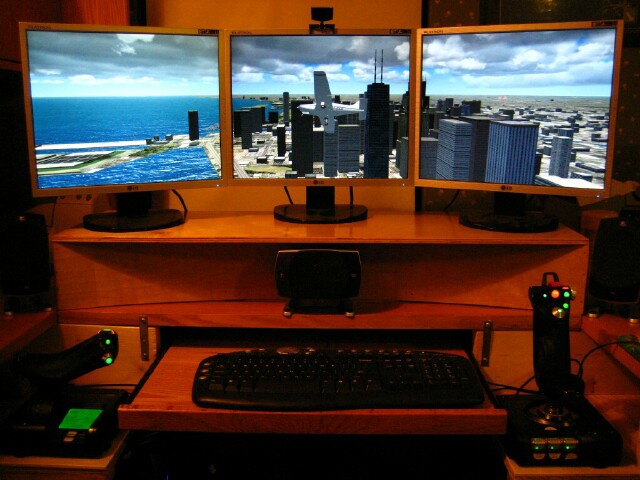
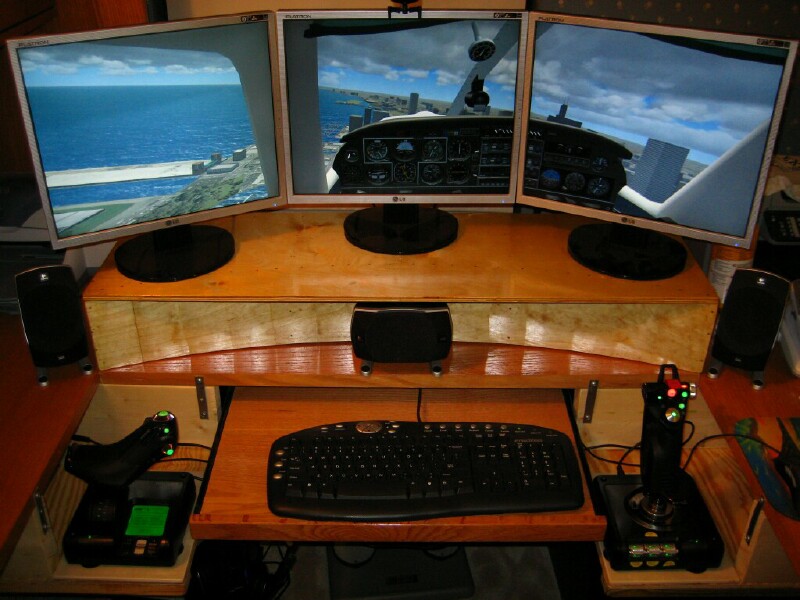 TX-ScubaSteveWhite 4
And here's the state of the art C-64 "over-clocked" at 1Mhz, averaging a sizzling ONE frame per second!
OK, here's what I actually spent my money on... and built a stand for my three monitors, as well as supports for my X-52Pro, so I can sit with them straddling my chair and at armchair level.
TX-ScubaSteveWhite 4Title: Re: My proposed new system
Post by: TX-EcoDragon on October 17, 2007, 01:21:10 pm
Very Nice!!!!!!!!S!TX-EcoDragonBlack 1TX-Squadron XO