To those pilots testing the rotorcraft waters in Black Shark:
So you have just completed your first ramp start, maybe you’ve flown rotorcraft sims before and think this one is just another one of those. . .you transition into forward flight, cruise up the coastline, and spot a location you want to investigate. Raising the nose and slowing into a hover, you notice the bottom drops out, the caution annunciators are illuminated and beepin at you, the cockpit is shaking, the VSI is pointing straight down, and it just doesn’t seem like a good place to be! Whoopsy – you’ve just encountered what is generally known as “Settling with Power”
Yep this is just one of the many and varied joys of the simulation provided in black shark! It also brings up a few other things that should be mentioned right away with respect to rotorcraft flight dynamics and flight physics.
Settling with Power is also known as Vortex Ring State:
In essence, this effect is the result of encountering disturbed airflow generated by your own aircraft’s downwash (for detailed info see link below).
To avoid it:
*Maintain airspeed – it doesn’t need to be forward (though the airspeed instruments will show zero/low values in other directions) the aircraft must simply be moving forward, backwards, left or right as commanded via the cyclic/stick. (ie Yaw/anti-torque/”rudder” application does nothing to help you). Of course this is a helicopter . . .it’s built to hover. . .so see the next point.
* When transitioning into a hover, or while hovering, use caution to avoid descending at a rate any higher than you must, and never higher than 300 fpm or 1.5 m/s. That is not a very fast descent, so absolute care must be used when at low airspeeds.
*When descending, especially at lower speeds, maintain descent paths not greater than around 30 degrees.
*Also, avoid using more collective than is needed for any given maneuver – though counterintuitive at first, high collective settings increase the risk of encountering a vortex ring state and increase the risk that if you encounter it, you will have insufficient remaining power to escape it! It you see rotor RPM approaching the lower red radial line – you will be in trouble without a LOT of altitude.
*Select altitudes with sufficient terrain/obstruction clearance to allow recovery if settling does occur – this is handy when full attention can not be provided towards aircraft control – such as when in combat, or head down on the shkval.
Important note to those new to hovering: When initially learning to hover, my suggestion (in the sim of course) is to practice hovering at an altitude so low as to prevent you from being able to descend more than one or two few feet before encountering the ground. The reason for this is you are so low as to avoid any rapid descents, and being in close proximity to the ground, with a wide field of view (zoom out) will best allow you to see any drift over the ground while you get used to controlling the aircraft in the hover. If you are too high – you will not have sufficient visual cues to sense a few knots of drift backwards, left or right.
For a more detailed look at Settling with power, go here: http://www.dynamicflight.com/aerodynamics/settling_power/
Trimming - it's different than in a fixed wing aircraft:
As mentioned in the trim thread, the first thing you may notice is that the idea of what it means to be trimmed is a little bit different.
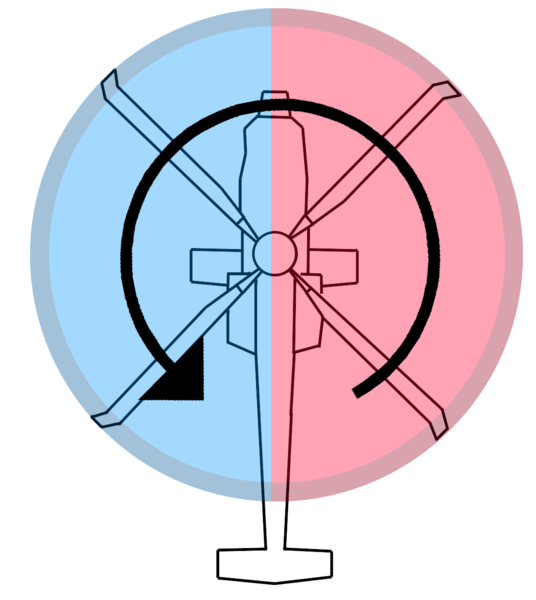
In essence, you will notice that when trimming for higher speed flight, that if you "center the ball" and trim the yaw axis, that you will generally have some bank, and some lateral translation. Alternatively, if you trim such that you have no apparent bank, you will find trimming the yaw axis to be a challenge. Lastly, you may also observe that when employing Route Modes of the auto pilot system the flight control system is subject to, and accepts these "deviations". These are a normal characteristic of rotorcraft. Keep in mind that there is necessarily and advancing and a retreating blade - as the helicopter moves forward, the blades on one side of the helicopter are moving forward relative to the aircraft, and the blades on the other side are moving backwards relative to the aircraft. . .see the following graphic for a visualization of this:
Of course this means that the effective airspeeds of the left vs right side of the rotor disk are going to be different. This is somewhat the same effect as p-factor in an airplane. . .in essence creating a dissymetry of lift:
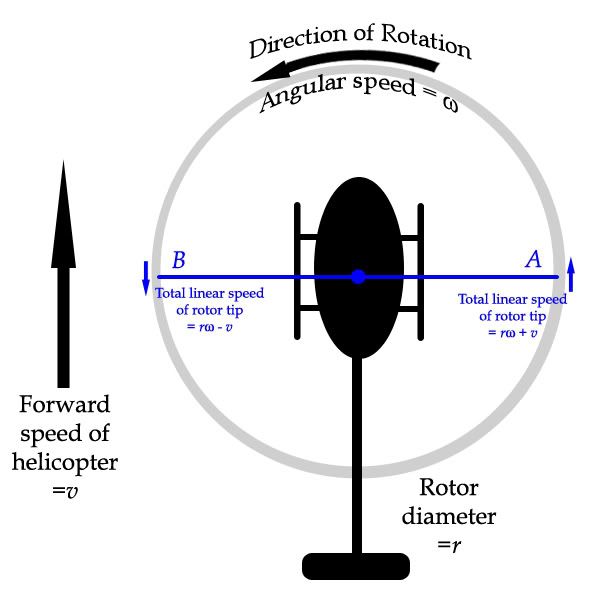
This effect is most pronounced in a conventional single rotor design, but the physics associated with a dual, counter rotating rotor system as employed on the Ka50 still result in this effect as the lower rotor and upper rotor experience different degrees of authority given their relative placement.
Blade Clash:
Given the somewhat unique counter rotating main rotor system of our Ka50, we also must be careful to avoid certain situations which may lead to contact between the upper rotor blades with the lower rotor blades.
To minimize blade clash:
*Avoid resetting trim at higher speeds.
*Avoid abrupt direction changes and maneuvers at higher speeds - especially when in "Flight Director" autopilot mode.
*Avoid abrupt use of the collective.
*When flying in conditions conducive to structural icing, always activate Rotor Anti-Ice BEFORE ice accumulation begins on the rotor blades.
Retreating Blade Stall:
We also have to consider a condition known as Retreating Blade Stall. Given the above diagrams, it should be understandable how this might happen. As airspeed builds, more and more of the retreating blade will start to stall. Ultimately, it is this very thing that limits the maximal forward speed of any rotorcraft. This is also why the rotors of your aircraft may seem to flap as they rotate. . .up on one side, and down on the other. In the case of the Ka50, this will also lead to blade clash between the upper and lower rotor blades.
For more detail, see the following link:
http://www.dynamicflight.com/aerodynamics/retreating/Also:
http://www.waybuilder.net/sweethaven/Aviation/Aerodynamics01/lessonMain.asp?iNum=0309S!
TX-EcoDragon
Black 1
TX-Squadron XO
