Username:

Password:

Pages: [1]
  Print  
Author Topic: Panel Introduction (Under Construction)  (Read 3898 times)
TX-EcoDragon
BLACK 1
Administrator
Hero Member
*****
Offline Offline

Posts: 3034


G's Please


View Profile WWW
« on: October 12, 2004, 06:57:12 pm »

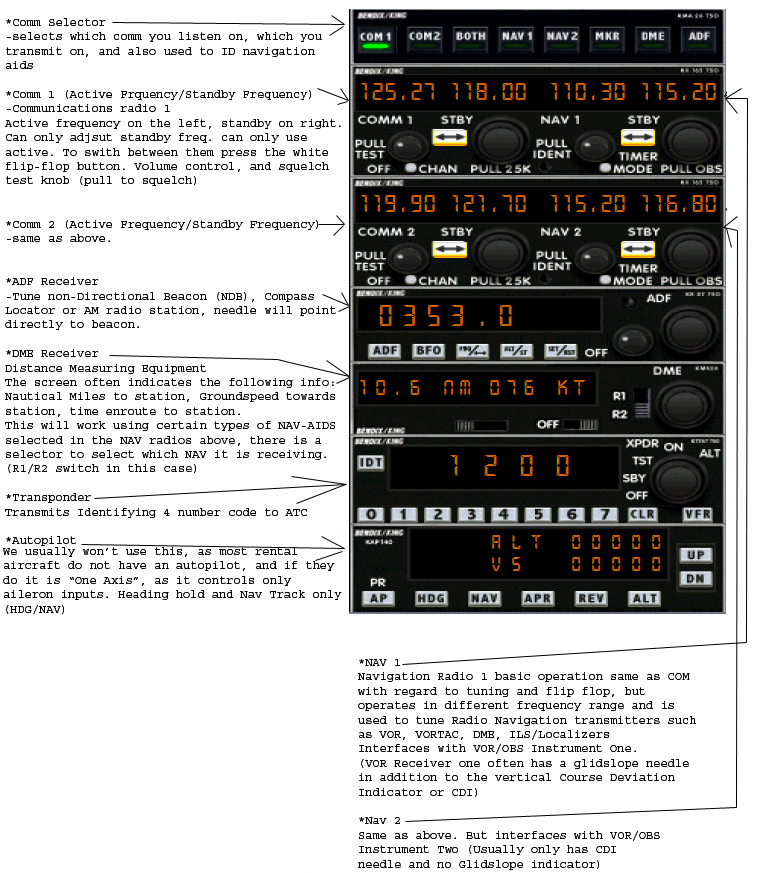
Bendix/King Radio Stack as found in the RealAir Simulations 172 (and many others)

This is a common arrangement of the radios and related equipment that comprise a well equipped (IFR) Aircraft radio stack.

Learn the names and positions of each component as well as how  to set/adjust them, initially with  emphasis on the NAV and Com radios in particular, as these will be used on your first flights with TX Flight Sim Ground School. If you know what the standby frequency of Nav 2 is, for example, it will make life a bit easier for all.

Also note that the "Comm Selector" is more aptly called the audio panel.


S!

TX-EcoDragon
Black 1
TX-Squadron XO


Logged

S!

TX-EcoDragon
Black 1
TX-EcoDragon
BLACK 1
Administrator
Hero Member
*****
Offline Offline

Posts: 3034


G's Please


View Profile WWW
« Reply #1 on: October 12, 2004, 08:47:44 pm »

This is a cut-out of the right 1/3rd of the 2D panel that contains the navigation equipment and other instruments/controls. (note that the virtual cockpit is the realistic view, but this view presents the instruments in a clearer manner). The Virtual cockpit view will be shown later.I should also add that in the case as presented above, the aircraft is heading TO the station (as  indicated by the upward pointed flag that can be found to the right of where it says NAV on VOR 1, and on the right side of VOR 2), and is to the left of the radial selected. What this means is that if you want a heading of 090 degrees (east) to take you direct to the station you must turn right somewhat, center the vertical needle (that is pictured just to the right of center), and then turn back to a heading of 090 (plus or minus a wind correction angle) to track to the fix on that radial. S!TX-EcoDragonBlack 1TX-Squadron XO
Logged

S!

TX-EcoDragon
Black 1
Pages: [1]
  Print  
 
Jump to: